Security plugins for OpenCode.
I’ve been testing some plugins to improve OpenCode’s security.
Claude Code Safety Net
The first one is called Claude Code Safety Net, and it intercepts dangerous git and filesystem commands before they execute.
The GitHub documentation covers interesting topics like:
- Why use it instead of permission denial rules
- Permission rules have known ways to bypass them
- Safety Net can handle things patterns can’t
Let’s install it manually by adding the plugin to the opencode.jsonc file:
Here’s how the plugin was added to the existing plugins list:
We can run a diagnostic using:
We can also see why a specific command gets blocked (for example “git reset –hard”) by running:
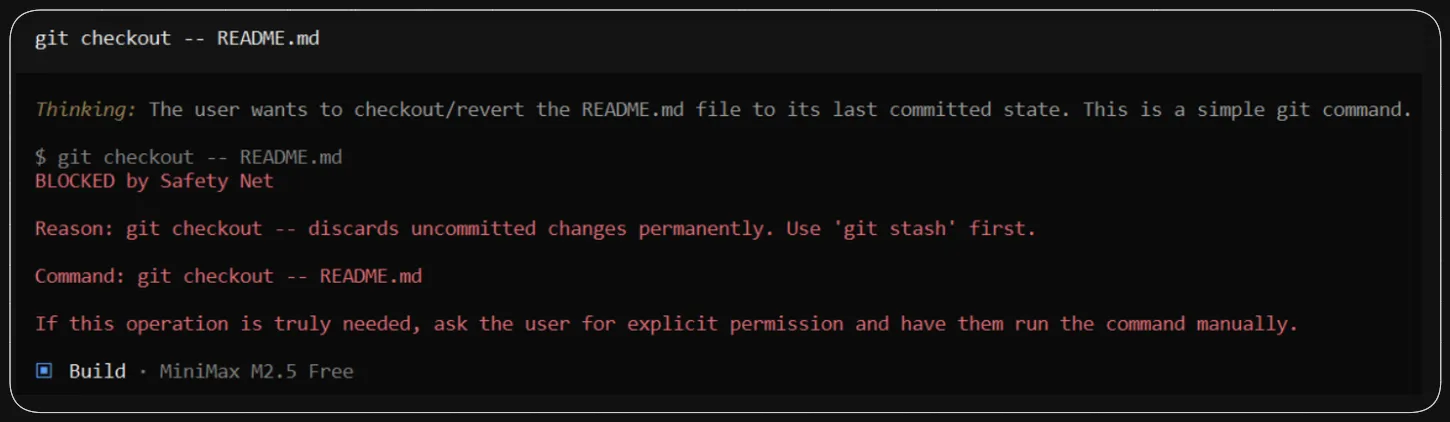
We can test it inside OpenCode in a test project with a README.md file that has changes, by asking the agent to execute the dangerous command:
Envsitter Guard
Another security tool I’ve tested is envsitter-guard. Its purpose is to prevent agents and tools from exposing sensitive .env file information that could leak in logs, sessions, screenshots, etc.
To install it, add to the plugins array in opencode.jsonc:
"envsitter-guard@latest"
If OpenCode is open, close it and reopen it.
We can also check in OpenCode if the plugin loaded by pressing Ctrl+P and selecting “view status” in the System category. There we can also see the active plugins.
To test it, we can ask OpenCode to read a .env file.

You can see the process I followed in this video (Spanish audio).